Answers based on ZENPORT’s official manuals, in Japanese or English
Tokyo, Japan — [October 20], 2026 — Zenport Inc. (Head Office: 1-9-2 Marunouchi, Chiyoda-ku, Tokyo; CEO: Fumiyuki Ota; “Zenport”) has added “AskZENPORT,” an AI support chat for questions about how to use ZENPORT and what the fields on its screens mean, to ZENPORT, the global supply chain data hub. AskZENPORT is now available.
AskZENPORT opens from the bottom-right corner of the ZENPORT screen. Users type a question while logged in to ZENPORT, and AI answers based on ZENPORT’s official manuals. AskZENPORT supports both Japanese and English.
■ Background
ZENPORT brings together global supply chain data—orders, shipments, containers—across companies in different roles, such as importers, exporters, freight forwarders, and warehouses. To support a wide range of use cases, its screen fields are defined down to the details of the work: a single date, for example, can carry an initial plan, revisions, and an actual result.
Until now, users who were unsure how to do something or wanted to confirm what a field meant had two options: consult the manuals or contact ZENPORT support. Time spent searching or waiting for an answer stops the work at hand, and users had asked for a way to check on the spot, within the screen.
■ What AskZENPORT Offers
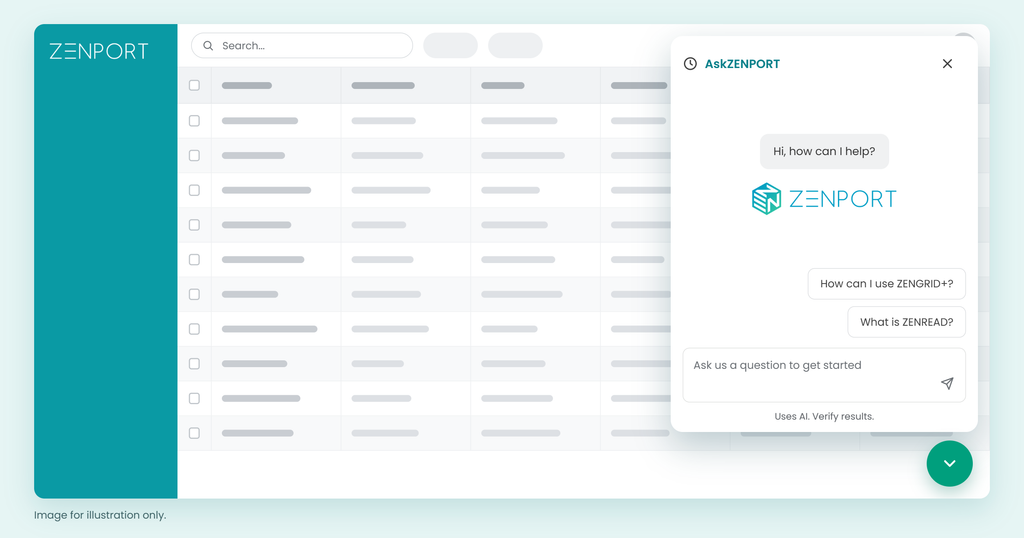
1. Accessible from the bottom-right corner, at any time
AskZENPORT opens from a button at the bottom right of any ZENPORT screen. It remains accessible even while a detail panel is open alongside, so users can ask questions without interrupting their work.
2. Guidance on navigating ZENPORT and field definitions
AskZENPORT answers questions such as “How do I create a shipment?” or “What does this date refer to?”
3. In Japanese or English
Because AskZENPORT supports both Japanese and English, staff at overseas sites and at overseas trading partners can use the same chat.
AskZENPORT may not be able to answer questions on matters the official manuals do not cover.
■ Company Overview
Company name: Zenport Inc.
Address: GranTokyo South Tower 11F, 1-9-2 Marunouchi, Chiyoda-ku, Tokyo 100-6611, Japan
Representative: Fumiyuki Ota, CEO
Business: Development and provision of an AI-native ontology platform for global supply chains (ZenRead, ZenMapping, Zentology). Under the banner “Connect without asking partners to change,” Zenport is the proponent of “Fit to Ontology”—“Here, it is AI, not humans, that performs the Fit.” The AI that fits, not the human.
URL: https://zenport.io
■ Media Contact
Zenport Inc., Public Relations — https://zenport.io/contact/
Simultaneous translation of multiple shipping documents into ERP data, with every document managed on the billboard
Tokyo, Japan — October 15, 2026 — Zenport Inc. (Head Office: 1-9-2 Marunouchi, Chiyoda-ku, Tokyo; CEO: Fumiyuki Ota; “Zenport”) has introduced “ZenRead Billboard” to ZenRead, its AI agent that translates shipping documents into ERP data. ZenRead Billboard enables AI to process submitted documents autonomously and manage them on a single list. ZenRead Billboard is available from October 15, 2026.
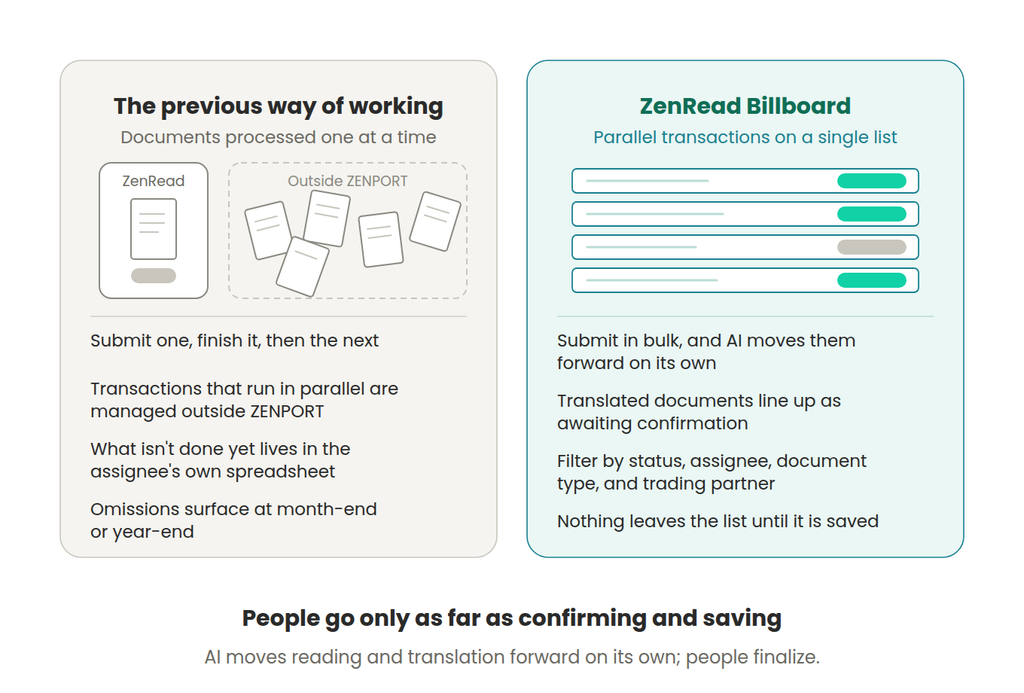
When shipping documents are submitted in bulk to ZenRead Billboard, ZenRead reads and translates them without waiting for human instructions, and lines them up on the list as awaiting confirmation. People open each document from the list, confirm its content, and save it. Once saved, the content is reflected in the operational data in ZENPORT, and a submitted document remains on the list until this confirmation and save are complete.
Background — Beyond OCR: Managing What Is Done and What Is Not
In global supply chain operations, commercial invoices and other shipping documents arrive in a different format from every trading partner, landing in the inboxes and shared folders of the people in charge. Operators have traditionally opened each document one at a time, read its contents, reconciled it with their own items and with the matching line on the purchase order (PO), and entered it into their ERP systems.
ZenRead lets AI take over this “reading” and “translating,” reducing manual entry. Previously, however, each document had to be processed to completion one at a time. In most operations, numerous transactions progress in parallel, and which documents were done and which were still pending had to be managed outside ZENPORT. ZenRead Billboard consolidates all of this on a single list.
What ZenRead Billboard Does
1. Submit, and AI takes it from there
Multiple shipping documents can be submitted at once. Each submitted file becomes its own entry on the list. ZenRead reads each document, matches it against the synced ERP data—PO details, the item master, and the like (contextual data matching)—translates it into the customer’s items, ties it to the matching line on the purchase order, and lines it up as awaiting confirmation. No action from a person is needed in the meantime.
2. The list of documents awaiting confirmation
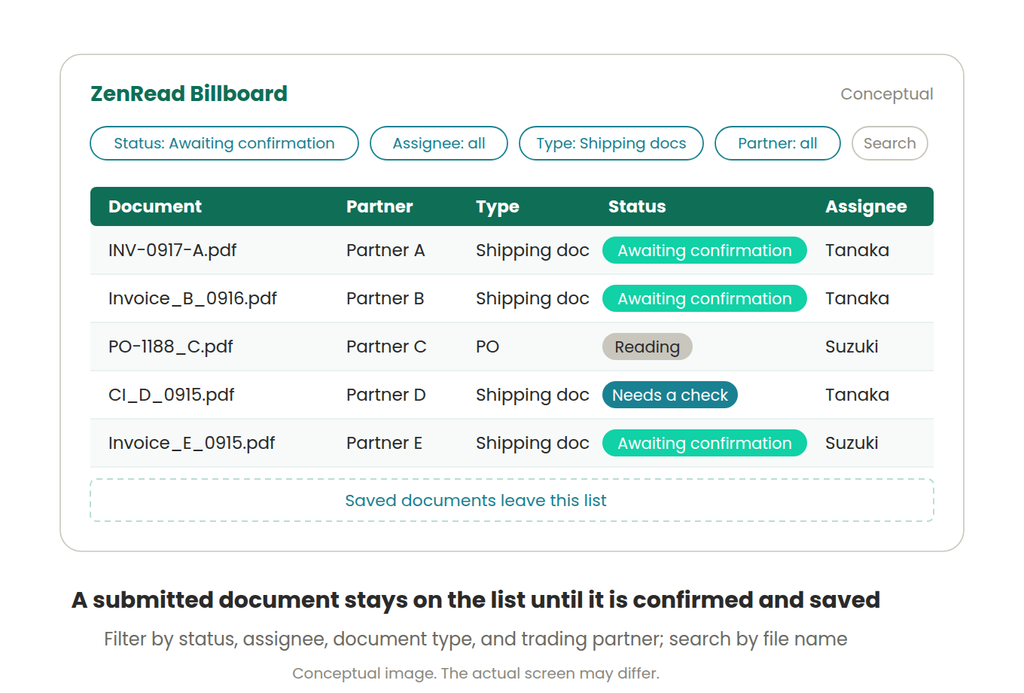
Documents that have been read remain on the list as awaiting confirmation; documents that AI could not finish reading remain on the list, flagged for a person to check. Users can filter the list by status, assignee, document type, or trading partner, and search by file name. An assignee can be designated at submission; if none is set, it defaults to the submitter.
3. Confirm and save, and it leaves the list
Opening an entry from the list displays the translation result on screen (SmartGrid) for confirmation and, where needed, correction. Upon saving, the content is reflected in the operational data in ZENPORT, and the document leaves the list. Operational data remains unchanged until the save. A submitted document remains on the list until it is saved or explicitly set aside as not needed.
About the Name
A billboard was originally a board on which bills (notices) were posted. In the context of shipping documents, a bill is also a bill of lading (B/L), and an invoice is a bill. ZenRead Billboard is the board where documents (bills) read by AI are posted, and where people confirm them and pass them through. Posted documents can be sorted, and leave the billboard once confirmed and saved.
How People and AI Share the Work
ZenRead is designed around Human in the Loop. On ZenRead Billboard, AI autonomously advances the reading and translation of submitted documents, and people go only as far as confirming the content and saving it. AI handles the reading and the entry; confirming and finalizing remain in human hands.
The Contextual Data Prepared by ZenMapping
ZenRead’s translation is done by matching against contextual data—the customer’s ERP data synced into ZENPORT. The mapping and synchronization of this ERP data are handled by Zenport’s AI agent “ZenMapping.” Documents on ZenRead Billboard therefore arrive pre-matched against this contextual data, awaiting confirmation.
Data Handling
Customer data is not shared with other companies, and it is not used to train models.
Where ZenRead Billboard Stands
Zenport defines ZenRead’s job not as reading documents, but as connecting what has been read all the way through—to which of the customer’s items it is, and to which line of which PO it belongs—and finalizing it as operational data. ZenRead Billboard is the workspace where AI advances the documents and people finalize them. Everything between a document’s arrival and its finalization—which documents are still pending and which are done—is managed on a single list within ZENPORT, not outside it.
Future Outlook
Building on ZenRead Billboard, ZENPORT will progressively expand the part of the work that AI handles autonomously, from receiving documents through to reflecting them in operational data. Supported document types and integration targets will continue to grow.
Related Information
Press release: [ZENPORT Enhances Contextual Data Matching in Its AI Agent “ZenRead” — Reconciling Shipping Documents Line by Line with Purchase Orders] (October 2, 2026)
Press release: [ZENPORT Overhauls Its AI Agent “ZenMapping” for ERP Integration — Shifting Data Mapping from “Inference” to “Derivation”] (October 2, 2026)
About ZENPORT — A World Where Cognitive Diversity Creates Prosperity and Innovation
ZENPORT envisions a world where global data, people, and economies are seamlessly connected, enabling sustainable prosperity and innovation through cognitive diversity.
Under this vision, Zenport provides a data foundation that lets customers connect across organizations without asking their partners to change: ZenRead, which connects trade documents to operational data, and ZenMapping, which connects data to ERP systems and master data reproducibly and traceably.
Company Overview
- Company name: Zenport Inc.
- Address: GranTokyo South Tower 11F, 1-9-2 Marunouchi, Chiyoda-ku, Tokyo 100-6611, Japan
- Representative: Fumiyuki Ota, CEO
- Vision: “A world where differences become strengths.”
- Mission: “Connecting data across organizations and processes to accelerate business.”
- Business: Development and provision of an AI-native ontology platform for global supply chains. Proponent of “Fit to Ontology.”
- URL: https://zenport.io
Media Contact
Zenport Inc., Public Relations — info@zenport.io
Matching product details and transaction history to translate each partner’s differently coded item names into the customer’s own items
Tokyo, Japan — September [DD], 2026 — Zenport Inc. (Head Office: Chiyoda-ku, Tokyo; CEO: Fumiyuki Ota; “Zenport”) has strengthened the judgment capability of ZenRead—its AI agent that reads shipping documents and translates them into the definitions used in the customer’s ERP data—through enhanced contextual data matching. The enhancement has been available since August 10, 2026.
ZenRead matches the details written on a document—trading partner, quantities, unit prices, and the like—against the transaction history with each partner held in the customer’s synced ERP data: the data that shows the context of the transaction. On this basis, it translates item names written in each partner’s own scheme into the customer’s items, ties each one to the matching line on the corresponding purchase order (PO), and determines exactly which line of which PO the document is for.
■ Background — Beyond OCR: The Heavy Work of Judging What Has Been Read
In global supply chain operations, the product names on commercial invoices and other shipping documents arrive in a different format and wording from every trading partner. With AI-OCR now widespread, the step of reading the text has largely been automated. But judging which of the company’s own items a reading corresponds to, and which line of which PO the document is for, still rests on the experience and manual work of the people in charge. The further reading and digitization advance, the more the step that follows—reconciling to the company’s items and purchase orders—stands out as the heavy manual work left after reading.
■ Where ZenRead Stands
The standard Zenport sets for document AI is not only that it can read text. It is that what has been read is connected all the way through: to which of the customer’s items it is, and to which line of which PO it belongs.
Starting from the moment a document arrives, ZenRead carries the work through in a single flow, from identifying the item to reconciling it against the purchase order, line by line. It does not do away with judgment. It leaves human confirmation to the cases that need it—and that alone takes most of the burden out of the work.
ZenRead started as an AI-BPO service and has since automated more and more of this judgment. Today it runs as an AI agent, executing everything from reading to reconciliation in one flow.
It asks for no changes—not to trading partners’ document formats, and not to the customer’s ERP systems.
■ Key Features
1. Item identification through contextual data matching
ZenRead identifies which item in the customer’s item master a product written on a shipping document corresponds to. It does not use probabilistic scores to make that judgment. It matches the details on the document—trading partner, quantities, unit prices, and the like—against the transaction history with each partner in the synced ERP data, and identifies the item within the context of that transaction.
In this way, item names written in each partner’s own scheme are translated into the customer’s items.
2. Line-by-line reconciliation with purchase orders
ZenRead ties each document to the specific purchase order, and the specific line on it, that the document is for. From the moment a document arrives, it updates which PO quantities are in transit and which order balances remain open. Even with corrections, split shipments, or transactions that span several documents, it keeps each document tied to the right line of the purchase order.
[Figure 1: English version of the published three-column comparison]
Note: Line-by-line reconciliation with purchase orders is available when PO data is synced.
3. People step in only where confirmation is needed
Reading a document and making the business judgment are two different jobs. In ZenRead, AI carries the work through in one flow—reading, identifying the item, and reconciling it against the purchase order. People confirm only what needs confirming.
Rather than leaving AI-OCR output as raw text, ZenRead connects it to the company’s items and to the right lines of its purchase orders, and carries it forward to a business judgment. This is the Human in the Loop design ZenRead has held to since launch.
■ In Practice — Knowing What Is in Transit
Inventory that has been shipped but not yet received—goods in transit—cannot be physically counted, and the evidence for its quantities and breakdown is scattered across documents from each trading partner. With ZenRead’s reconciliation, customers know which items are in transit and in what quantities, line by line against each purchase order, from the moment the documents arrive. In-transit inventory is captured from the shipping documents already handled in daily import and export work—and the records needed to keep a ledger build up as part of the workflow itself.
■ Implementation
ZenRead can be implemented on top of each trading partner’s existing workflows and document formats and the customer’s existing ERP systems. Because it works from data that already exists, it adds no new manual entry as a rule.
Data that customers enter or sync into the service, and the results it generates, are managed so that no other customer can view or use them. The service uses generative AI services under contracts and settings that prevent this data from being used to train or improve shared AI models. Zenport does not use this data to train models either, unless the customer explicitly consents or instructs otherwise.
■ Related Information
One Grid Journal, “Reconciling In-Transit Inventory Line by Line Against Purchase Orders” (Japanese): https://note.com/fumiyuki_ota/n/n6398524ec87a
Taking an importer’s in-transit inventory as its example, the article explains from an accounting and audit perspective why reconciliation must happen at the level of each line on the purchase order, not the document.
■ About ZENPORT — A World Where Cognitive Diversity Creates Prosperity and Innovation
ZENPORT envisions a world where global data, people, and economies are seamlessly connected, enabling sustainable prosperity and innovation through cognitive diversity.
Under this vision, Zenport provides a data foundation that lets customers connect across organizations without asking their partners to change: ZenRead, which connects trade documents to operational data, and ZenMapping, which connects data to ERP systems and master data reproducibly and traceably.
■ Company Overview
・Company name: Zenport Inc.
・Address: GranTokyo South Tower 11F, 1-9-2 Marunouchi, Chiyoda-ku, Tokyo 100-6611, Japan
・Representative: Fumiyuki Ota, CEO
・Vision: “A world where differences become strengths.”
・Mission: “Connecting data across organizations and processes to accelerate business.”
・Business: Development and provision of an AI-native ontology platform for global supply chains. Proponent of “Fit to Ontology.”
・URL: https://zenport.io
■ Media Contact
Zenport Inc., Public Relations — info@zenport.io